

When I started setting up tracking for Web Idea US – Marketing Lab, I had a simple choice: install every tracking code directly on the website, or set up Google Tag Manager first and manage tracking from there.
Technically, both options can work.
I could have placed the GA4 code directly into the WordPress theme. Later, if I needed Meta Pixel, LinkedIn Insight Tag, scroll tracking, outbound click tracking, CTA click tracking, or custom conversion events, I could have added those one by one too.
But that is exactly the problem.
A website that is supposed to grow should not turn into a collection of random scripts added at different times, in different places, for different reasons. That kind of setup may feel quick in the beginning, but it becomes fragile later.
So I chose a cleaner structure:
Website → Google Tag Manager → GA4 and future marketing tags
Google describes Tag Manager as a tag management system that lets you configure and deploy tags on a website or app from a web interface. It is designed to help manage measurement codes, troubleshoot configuration issues, and update tags without constantly editing website code.
For me, that was the real reason to use GTM. Not because every website needs every possible tracking feature on day one, but because every serious website needs a measurement structure that can grow.
The Problem With Installing Tags One by One
Installing tags directly is tempting because it feels faster.
You get the GA4 code, paste it into the website, and move on. Then later you add a Facebook pixel. Then maybe a LinkedIn tag. Then maybe a heatmap script. Then a conversion tracking code. Then a custom event snippet. Then something breaks, duplicates, or fires in the wrong place.
This is how many tracking setups become messy.
The problem is not always one bad tag. The problem is that there is no central control layer.
When tags are installed manually, several things become harder:
- checking what is firing
- preventing duplicate tracking
- managing future changes
- testing tags before publishing
- separating analytics logic from website design
- keeping marketing tools organized
This matters because tracking is not just a technical detail. Tracking shapes how we understand traffic, user behavior, campaigns, conversions, and eventually business decisions.
If the tracking setup is messy, the analysis becomes messy too.
What GTM Actually Solves
Google Tag Manager does not replace GA4. It does not analyze traffic by itself. It does not magically create strategy.
What GTM does is give me a control layer for tracking.
Instead of placing every tag directly into the site, I place one GTM container on the website. Inside that container, I can manage different tags, triggers, and events.
That means GA4 can fire through GTM. Later, scroll tracking can be added through GTM. CTA clicks can be tracked through GTM. Outbound clicks can be tracked through GTM. If I test a new marketing platform, I do not need to keep touching the website code every time.
This is especially useful for a site like Marketing Lab because the project is not static. It is built around experiments, observations, tools, visibility tests, and performance thinking. The tracking setup needs to support that.
Google’s own documentation also connects GTM with GA4 event setup, including recommended and custom events, which can help create more granular insight into user behavior and campaign performance.
That is exactly the direction I want for this site.
Not too much tracking too early.
Not random tracking later.
A clean base that can expand when the site needs it.
Why This Was Important for My Own Site
At this stage, Web Idea US – Marketing Lab is still early, but it is already a real project. The site is live. Articles are published. Google is indexing new content. The content system is being built with categories like Experiments, Case Studies, Tools & Reviews, Build in Public, and Resources.
That means I need reliable data.
Not perfect data. Not enterprise-level analytics. But reliable enough to answer useful questions:
Which articles are getting traffic?
Which pages are users entering first?
Do people scroll?
Do they click internal links?
Do they visit the Contact page?
Do future CTAs get attention?
Which content types create better engagement?
If I installed tracking one tag at a time, I might still get some answers. But I would also create more risk of duplicate firing, inconsistent events, and future cleanup work.
In fact, during the setup, GA4 initially fired twice. That was a useful reminder. Duplicate tracking can happen easily when analytics code exists in more than one place. After fixing the setup, GA4 fired one time only, which is the correct direction for clean measurement.
That experience confirmed the decision.
GTM is not just about convenience. It is about control.
GTM vs Manual Tags: The Practical Difference
The difference between GTM and manual tags becomes clearer when the website starts growing.
With manual tags, every new tracking need can become a website edit. You may need to touch the theme, plugin settings, header scripts, custom code areas, or developer files.
With GTM, many tracking changes happen inside one structured environment.
For a small business owner, this means fewer technical interruptions. For a marketer, it means more flexibility. For a consultant, it means cleaner implementation. For a growing website, it means fewer scattered tracking decisions.
Manual tags can still make sense in simple situations. If a website only needs one analytics code and nothing else, direct installation may be enough. But once the website has multiple tools, paid traffic, lead forms, conversion goals, or remarketing needs, GTM becomes much more useful.
For me, the choice was not only about today. It was about the next six months.
Where GTM Fits in a Real Marketing Workflow
I think about GTM as part of the measurement foundation.
Before scaling content, paid traffic, affiliate links, or conversion experiments, I want the site to have a clean tracking base. That does not mean tracking everything immediately. It means having the structure ready.
A practical GTM workflow looks like this:
First, install the GTM container on the website.
Then connect GA4 through GTM.
Then verify that GA4 fires once.
Then use Tag Assistant and GA4 DebugView when needed.
Then add more events only when there is a real business reason.
That last part matters.
I do not believe in tracking everything just because it is technically possible. More events do not automatically mean better insight. Bad event planning can create noise.
For Marketing Lab, the next useful tracking layers may include scroll depth, outbound clicks, internal CTA clicks, resource downloads, and maybe affiliate link clicks later. But those should be added intentionally.
Tracking should answer questions, not create dashboards full of vanity signals.
What I Like About GTM
The biggest strength of GTM is that it creates separation between the website and the tracking system.
That separation is valuable.
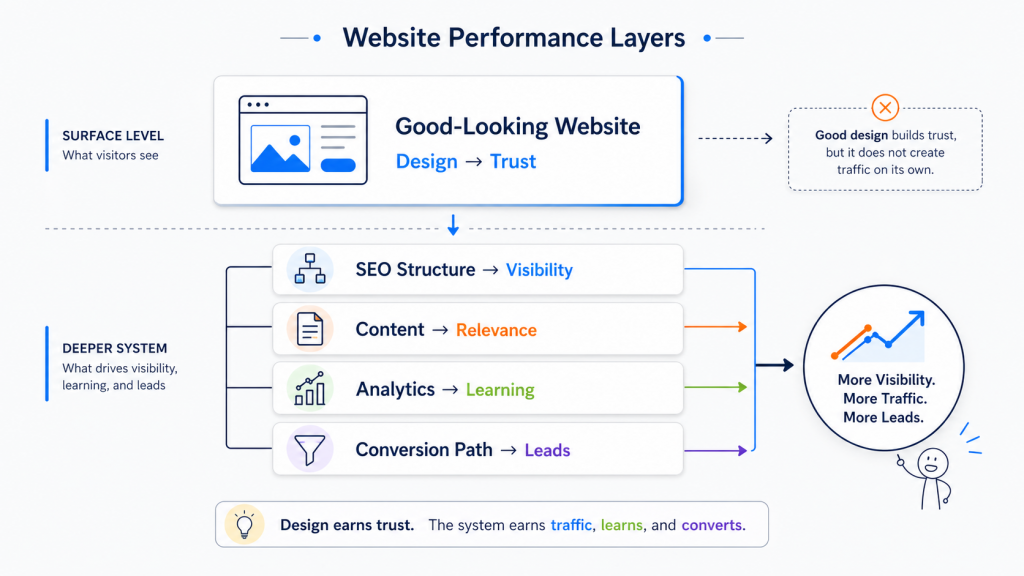
The website can focus on content, structure, UX, and publishing. GTM can manage measurement logic. GA4 can collect and report behavior data. Each layer has a clearer role.
I also like that GTM makes future testing easier. If I want to test a new event, I do not need to redesign the website. If a tag is wrong, I can troubleshoot it in a more controlled way. If I need to pause something, I can do that without hunting through the site.
For a marketing lab, that flexibility matters.
Where GTM Can Still Go Wrong
GTM is not automatically clean just because it is GTM.
A messy GTM container is still messy.
If tags are named poorly, triggers are duplicated, events are inconsistent, or nobody documents what was added, the container can become confusing. GTM gives structure, but the marketer still needs discipline.
That is why I prefer a simple starting setup:
GA4 configuration
basic page view tracking
clear naming
no unnecessary tags
future events added only when needed
A clean small setup is better than an impressive but chaotic one.
Final Take
I chose GTM instead of installing tags one by one because I want this website to grow with a clean measurement foundation.
Manual tags may feel faster at the beginning, but GTM is better for a site that will evolve. It gives me one place to manage tracking, one structure for future events, and a safer path for analytics, paid traffic, affiliate tracking, and conversion measurement.
For Web Idea US – Marketing Lab, that matters.
This site is not just a blog. It is a public marketing lab where visibility, traffic, analytics, tools, and growth ideas are tested in real conditions. A lab needs clean instruments.
For me, GTM is one of those instruments.