One of the easiest ways to waste money in marketing is to buy tools before you’ve defined the actual problem.
I’ve seen this happen in small businesses, internal teams, and sometimes even in agencies. Someone decides the business needs “better data,” “better SEO,” or “more traffic insights,” and suddenly a paid platform is added to the monthly stack. A few weeks later, the team is still confused, the workflow is messy, and nobody can clearly explain what the tool was supposed to solve in the first place.
That’s why I wanted to write this piece.
There are many digital marketing analysis tools on the market, and some of them are genuinely useful. But not all of them are useful at the same stage, and not all of them deserve a place in every workflow. In many cases, free tools are enough to build a strong starting point. In other cases, paid tools become valuable because they help you answer questions that free platforms simply can’t answer well.
The real question is not “Which tool is best?”
The real question is: Which tool is useful for the stage you’re in right now?
That’s the lens I use when I look at tools for digital marketing analysis.
What Digital Marketing Analysis Tools Are Actually For
Before choosing tools, it helps to clarify what digital marketing analysis actually involves.
At a practical level, digital marketing analysis usually means trying to understand things like:
- how visible a website is
- where website traffic comes from
- how users behave once they arrive
- what search demand exists around a service or offer
- how competitors are positioned
- whether a site is technically healthy enough to grow
- what should happen before and after a website launch
That is why this topic connects naturally to both digital marketing analysis before website launch and the bigger question of where to get traffic for my website. Tools help answer those questions, but they do not replace strategic thinking.
A platform can show you numbers.
It cannot decide which numbers matter for your business stage.
That part is still yours.
The First Mistake: Building a Tool Stack Before Building a Question
A lot of businesses approach tools backwards.
They start with the subscription, not the decision.
For example:
- they buy an SEO suite before they have a content structure
- they install analytics but do not define meaningful actions
- they add heatmaps before they understand their traffic quality
- they compare competitor traffic tools before they know whether organic or paid matters more right now
This creates an expensive illusion of progress.
The dashboard exists.
The reports exist.
The login exists.
But strategic clarity does not.
When I think about tools for digital marketing analysis, I try to separate them into four jobs:
- Traffic and behavior understanding
- Search and visibility research
- Technical website evaluation
- Competitor and market context
Once you understand those jobs, it becomes much easier to choose tools without overbuying.
Free Digital Marketing Tools That Are Stronger Than People Think
There is a tendency to assume free means basic or weak. That’s not always true.
Some of the most useful free digital marketing tools are strong enough to support an early-stage site, a small business, or a foundational visibility review.
Google Search Console
If I had to choose one free tool for organic search visibility, it would be Google Search Console.
What it actually helps with:
- understanding which pages are being indexed
- seeing early impressions and clicks
- reviewing which queries trigger visibility
- identifying CTR patterns
- spotting which content is beginning to get picked up
What I like about it:
It shows real search behavior connected to your site. That makes it extremely valuable for early-stage websites, content experiments, and post-launch monitoring.
Where it falls short:
It does not give deep competitor data. It won’t replace keyword research platforms. And it often tells you what already happened, not what opportunity exists beyond your current footprint.
When I would use it:
Always. Especially for content tracking, indexing observation, and early visibility diagnostics.
When I would choose something else:
When I need deeper competitor analysis, keyword gap review, or broader market-level SEO research.
Google Analytics 4
GA4 is powerful, but it is only useful if you know what you want to measure.
What it actually helps with:
- traffic source patterns
- sessions and engagement
- page-level behavior
- event-based tracking
- cross-channel performance review
What I like about it:
Once set up properly, it gives you a real behavioral layer. It helps move the conversation beyond “we got traffic” into “what did users actually do?”
Where it falls short:
GA4 can be confusing for non-specialists, and poor setup makes the data much less useful. It also does not solve SEO analysis or competitive visibility by itself.
When I would use it:
For website traffic review, content engagement, user flow, and conversion path analysis.
When I would choose something else:
When I need search-specific insight, keyword opportunity research, or technical crawling.
Google Tag Manager
I don’t treat GTM as a “nice to have.” I treat it as infrastructure.
What it actually helps with:
- cleaner tag deployment
- tracking flexibility
- event management
- future-proof analytics setup
What I like about it:
It gives control. Instead of hard-coding every tracking change one by one, GTM lets you build a cleaner measurement environment.
Where it falls short:
It doesn’t “analyze” anything on its own. It supports measurement, but you still need GA4 or another platform to read the data properly.
When I would use it:
On almost any serious marketing website, especially if future tracking needs are likely to grow.
When I would choose something else:
Not really an either/or choice. GTM is more of a foundation than an alternative.
Google Trends
Google Trends is often underestimated because it looks simple.
What it actually helps with:
- directional search interest
- trend comparison
- seasonality
- topic comparison
- language and framing insight
What I like about it:
It’s fast, useful, and good for directional thinking before building content or launching a new angle.
Where it falls short:
It’s not deep keyword research. It doesn’t replace SEO platforms, and it’s not enough for precise planning on its own.
When I would use it:
During topic validation, early content planning, and interest comparison.
When I would choose something else:
When I need actual keyword depth, SERP difficulty context, or page-level competitor analysis.
Google Keyword Planner
Keyword Planner is still useful, especially when you approach it correctly.
What it actually helps with:
- initial search demand review
- rough keyword grouping
- paid search context
- early idea validation
What I like about it:
It’s accessible and connected to real ad ecosystem logic.
Where it falls short:
Its ranges can be broad, and it’s not as strategic or flexible as dedicated SEO platforms.
When I would use it:
For paid search thinking, early demand checks, and small-business level validation.
When I would choose something else:
When I need more nuanced organic search research or broader competitive visibility insight.
Microsoft Clarity
Clarity is one of my favorite examples of a free tool that gives practical value quickly.
What it actually helps with:
- session recordings
- heatmaps
- user friction insight
- visual behavior review
What I like about it:
It helps answer the question that dashboards often can’t: what are people actually doing on the page?
Where it falls short:
It won’t tell you whether the traffic was the right traffic to begin with. It’s a behavior layer, not a visibility engine.
When I would use it:
When I want to understand friction, page engagement, and user experience issues.
When I would choose something else:
If I’m trying to solve search demand, keyword planning, or competitor visibility.
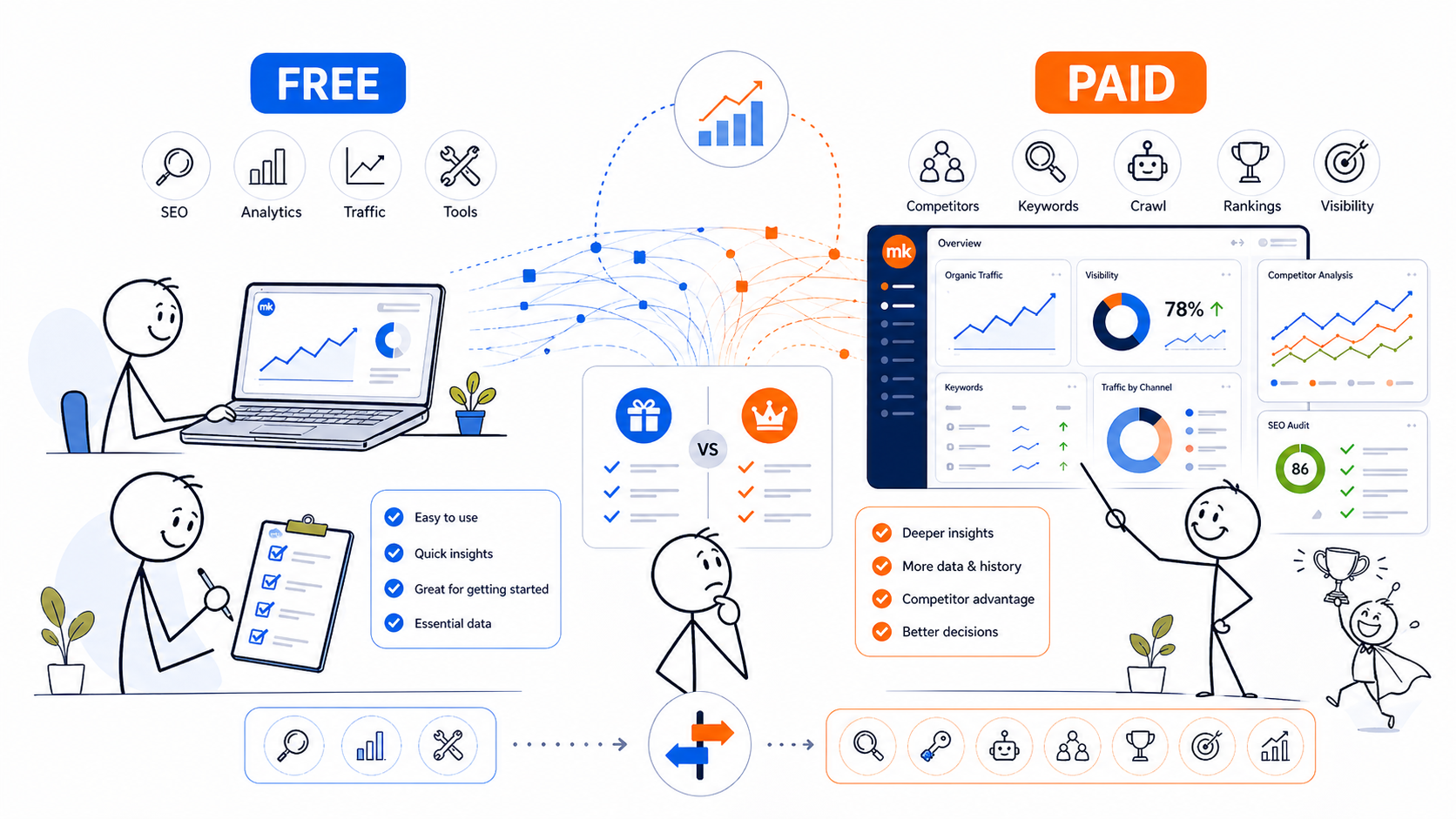
When Free Tools Are Enough
For many early-stage projects, free tools are enough to build a strong starting analysis environment.
If your site is:
- new
- still building content
- not yet heavily monetized
- not yet dependent on aggressive SEO scaling
- not yet running sophisticated reporting workflows
then a basic stack like this can be more than enough:
- Google Search Console
- Google Analytics 4
- Google Tag Manager
- Google Trends
- Microsoft Clarity
That is already a meaningful stack.
It can help you understand:
- whether your pages are being indexed
- whether website traffic is arriving
- where that traffic comes from
- how people behave on the site
- whether content is being picked up
- where UX friction may exist
In other words, it covers a lot of the foundational work without forcing you into paid subscriptions too early.
When Paid Tools Become Worth It
Paid tools become valuable when your questions become deeper than your current stack can answer.
That usually happens when you need one or more of the following:
- competitor visibility research
- larger keyword opportunity mapping
- deeper technical website analysis
- broader traffic benchmarking
- faster SEO decision-making
- workflow efficiency across multiple sites or stakeholders
This is where paid digital marketing tools stop being optional convenience and start becoming legitimate strategic assets.
Not because paid is always better, but because deeper questions need deeper tools.
Semrush
Semrush is often the first platform businesses consider, and that makes sense.
What it actually helps with:
- keyword research
- competitor visibility analysis
- content opportunity review
- site audits
- rank tracking
- market-level search insight
What I like about it:
It is broad. For marketers who want one platform that covers multiple SEO and visibility functions, it can be a strong choice.
Where it falls short:
Breadth can also mean noise. If the business has not defined its SEO priorities yet, Semrush can become an expensive dashboard that overwhelms rather than clarifies.
When I would use it:
For structured SEO research, visibility planning, keyword mapping, and competitor analysis.
When I would choose something else:
If I only need a narrow technical crawl or if the budget is too tight for a broad paid suite.
Ahrefs
Ahrefs is still one of the strongest tools for search visibility research.
What it actually helps with:
- keyword research
- backlink analysis
- content gap thinking
- SERP pattern review
- organic research
What I like about it:
It often feels sharp and focused. Good for people who want strong SEO research depth.
Where it falls short:
It can still be more than some businesses need at an early stage. It also requires enough strategic maturity to use well.
When I would use it:
For SEO-heavy workflows, content planning, search opportunity assessment, and authority-related research.
When I would choose something else:
If the main need is simple reporting, broader mixed-channel visibility, or a more entry-level stack.
Similarweb
I see Similarweb as a directional intelligence tool, not a truth machine.
What it actually helps with:
- directional traffic comparisons
- market landscape understanding
- channel mix approximations
- competitor pattern context
What I like about it:
It can help frame the broader environment, especially when you want to understand how players in a space may be getting traffic.
Where it falls short:
Its traffic estimates should not be treated as exact truth. It is useful for directional insight, not precision forecasting.
When I would use it:
For market context, rough competitor framing, and broader digital landscape interpretation.
When I would choose something else:
When I need precise on-site behavior or detailed query-level SEO analysis.
Screaming Frog
Screaming Frog is one of the most useful technical website analysis tools available.
What it actually helps with:
- crawling a website
- finding technical SEO issues
- reviewing metadata patterns
- spotting broken pages or redirect problems
- auditing structural consistency
What I like about it:
It is incredibly practical when technical structure matters.
Where it falls short:
It is not beginner-friendly in the same way some dashboards are. And it won’t tell you if your strategy is wrong. It tells you what the site is doing technically.
When I would use it:
For technical audits, structure reviews, metadata checks, and crawl-based troubleshooting.
When I would choose something else:
If I only need lightweight visibility monitoring or behavior analysis.
How I Think About Choosing Tools by Business Stage
This is the part many articles skip.
I don’t choose tools only by feature list. I choose them by business stage.
Stage 1: New site or early growth
Use mostly free tools.
You need:
- indexing visibility
- traffic measurement
- behavioral insight
- basic trend awareness
Stage 2: Content and visibility planning
This is where paid SEO platforms start becoming more valuable.
You may need:
- keyword depth
- competitor mapping
- page planning
- opportunity sizing
Stage 3: Scaling and operational maturity
At this stage, tool choice becomes more workflow-driven.
You may need:
- multiple reporting layers
- technical auditing
- benchmarking
- team collaboration
- more advanced content and SEO systems
That is why the right tool is not only about capability.
It is also about timing.
What I Would Recommend in Practice
If someone asked me what I would use for a small or early-stage site, I would say:
Start with:
- Google Search Console
- GA4
- GTM
- Google Trends
- Microsoft Clarity
Add paid tools when you need:
- deeper keyword research
- stronger competitor insight
- technical crawling
- broader search visibility strategy
For many businesses, the mistake is not underbuying.
It is overbuying before the strategy exists.
Final Take
The best digital marketing analysis tools are not the ones with the biggest dashboards. They are the ones that help answer the next real question in your workflow.
Free tools are often enough to build the first strong layer.
Paid tools become worth it when the business has grown beyond surface-level questions and needs deeper search, technical, and market intelligence.
If I had to summarize it simply:
- free tools are strong enough to start
- paid tools are worth it when the questions get harder
- no tool is useful if the strategy is still vague
That is how I think about tool selection in real marketing work.