
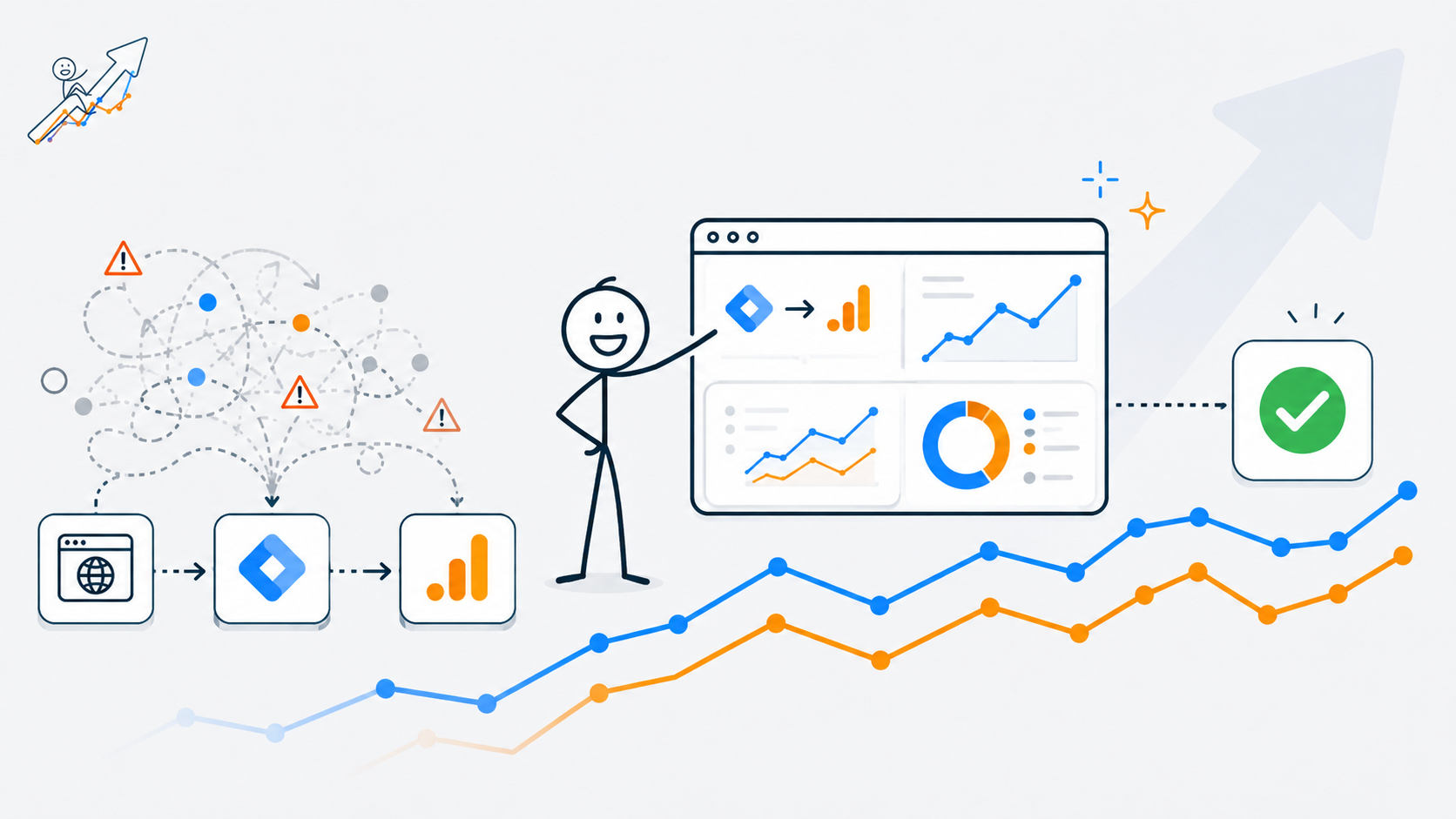
When I set up Google Tag Manager and GA4 on my own site, I expected the process to be mostly technical.
Install the container. Add the GA4 tag. Check Tag Assistant. Confirm that data is flowing. Move on.
In reality, the setup taught me something more important: analytics is not just a reporting layer. It is part of the marketing foundation.
A website without tracking can still exist. It can still look professional. It can still publish articles, collect impressions, and appear in search results. But without a clean measurement setup, the site is harder to learn from. You can see that something is happening, but you cannot always understand what it means.
That matters especially for a project like Web Idea US – Marketing Lab, where the whole purpose is to test marketing ideas in real conditions. This site is not only a portfolio or a blog. It is a public marketing lab where SEO, traffic, visibility, analytics, content structure, and growth decisions are being observed over time. The project itself is built to document real marketing thinking and performance signals in public.
So when I set up GTM and GA4, I was not just “adding analytics.”
I was building the first measurement layer for the lab.
What I Wanted to Test
The question behind this setup was simple:
Can I build a clean analytics foundation early, before the site has meaningful traffic volume, so future performance data is easier to trust?
That may sound basic, but it is a question I see many businesses skip.
A lot of websites launch first and think about tracking later. They publish pages, run ads, send traffic, maybe even invest in SEO or social promotion. Then, when results are unclear, someone asks:
“Do we know what users actually did?”
And that is when the problem appears.
The business may have traffic, but not clean data. It may have leads, but no reliable source tracking. It may have page views, but no useful event structure. It may have conversions, but not enough confidence in where they came from.
I wanted to avoid that from the beginning.
My site is still early. The content base is still being built. The current priority is not heavy optimization of every page; it is creating enough content depth, structure, and internal logic so Google and AI systems can better understand the direction of the site.
But even at this early stage, I wanted the analytics foundation to be clean.
Because later, when traffic grows, the question will not be: “Did I install tracking?”
The question will be: “Can I trust what I am seeing?”
Why GTM and GA4 Matter Before Traffic Grows
I like to think about analytics setup in two layers.
The first layer is technical.
Is Google Tag Manager installed?
Is GA4 receiving data?
Is the tag firing once, not twice?
Are page views being collected?
Can Tag Assistant verify the setup?
The second layer is strategic.
What do I actually need to learn from this website?
Which user actions matter?
Which signals should become part of the performance dashboard?
Which events will help me understand content quality, not just traffic volume?
That second layer is where the real marketing value starts.
Google’s current documentation explains that to set up GA4 in Google Tag Manager, you configure the Google tag, which allows data to flow from the website to Google Analytics and other connected Google destinations. Google also recommends using a unique Google tag for each website.
That is the technical foundation.
But the marketing foundation is bigger than that.
For this site, GTM is not only a way to send page views into GA4. It is a flexible container for future tracking: scroll depth, outbound clicks, CTA clicks, affiliate clicks, email sign-up actions, and maybe later, more advanced engagement signals.
Google Analytics 4 is event-based, which means the measurement model is built around user interactions and occurrences rather than only old-style session reporting. Google describes events as interactions or occurrences on a website or app, such as a page load, click, or purchase.
That is why GTM and GA4 setup matters early.
If I wait until the site has traffic, monetization, affiliate links, and a larger content base, the setup becomes more reactive. I would be trying to reconstruct the story after the fact.
By setting it up now, I am creating a cleaner baseline.
The Initial Setup: Website → GTM → GA4
The architecture I wanted was simple:
Website → Google Tag Manager → GA4
That is the structure I prefer for most growing websites because it keeps tracking more flexible.
Instead of installing every script separately into the website, GTM becomes the control layer. That does not mean GTM makes everything automatically easy. It still requires attention. But it gives the site a better tracking architecture for the future.
For my own site, the setup included:
- installing GTM
- connecting Tag Assistant
- setting up GA4 through the tag structure
- checking whether the tag fired correctly
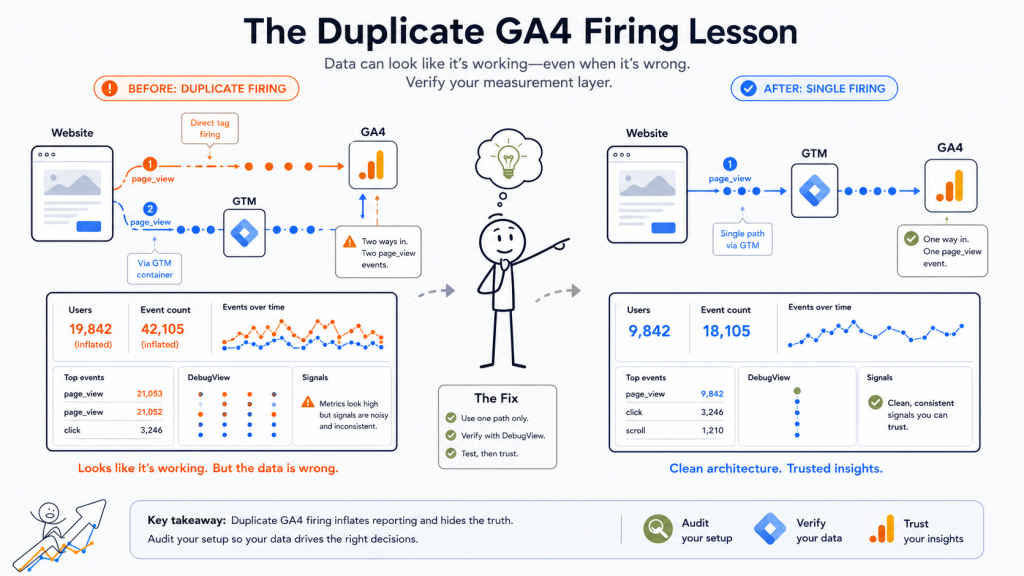
- identifying that GA4 initially fired twice
- fixing the duplicate tracking
- confirming that GA4 now fires one time only
That last part matters.
A duplicate GA4 firing issue may sound small, but it can damage trust in the data. If page views fire twice, then early analytics can look stronger than they really are. Sessions, engagement, event counts, and page-level performance can become inflated or confusing.
On a small site, the problem may not feel dramatic yet. But that is exactly why it is easier to fix early.
When traffic is low, you can test calmly. When traffic is higher and decisions depend on reporting, bad tracking becomes much more expensive.
The Duplicate GA4 Firing Lesson
The most useful lesson from this setup was not how to install GTM.
It was how easy it is to accidentally create duplicate tracking.
This can happen when GA4 is installed in more than one place. For example, a site might have GA4 added directly through a WordPress theme or plugin, and then also added through GTM. Or a tag may be configured in a way that causes the same page_view to be sent more than once.
The danger is that nothing may look obviously “broken.”
GA4 may show activity. Realtime reports may show users. Tag Assistant may show tags firing. At first glance, it can feel like the setup works.
But working and working correctly are not the same thing.
That is one of the biggest analytics lessons for business owners: data can look official and still be wrong.
A dashboard does not automatically mean the measurement is clean. A chart does not automatically mean the business is seeing reality. A report can be beautifully formatted and still be based on messy implementation.
For this site, the duplicate firing issue became a useful reminder:
Before interpreting data, verify the measurement layer.
That is especially important before making SEO, content, UX, or paid traffic decisions.
If analytics says a page is getting unusually high engagement, I need to know whether that is real behavior or a tracking artifact. If traffic appears to grow, I need to know whether it is growth or double counting. If I later test CTAs, affiliate links, or resource downloads, I need clean event data before drawing conclusions.
This is why I see tracking setup as part of marketing strategy, not just technical housekeeping.
What GA4 Gives Me Immediately
At the basic level, GA4 gives me visibility into early user behavior.
Even before advanced event tracking is configured, default analytics can help answer questions like:
- Which pages are receiving visits?
- Where are users coming from?
- Which devices are people using?
- Are visitors engaging or leaving quickly?
- Which content starts to attract attention?
- Are there early patterns by channel?
Google’s GA4 documentation notes that default implementation can collect information such as users, session statistics, approximate geolocation, and browser/device information.
For an early-stage site, this is enough to start observing directional signals.
I do not need to overbuild measurement on day one. I do not need twenty custom events before there is enough traffic to interpret them. I do not need a complex dashboard before the content system has enough depth.
But I do need a clean base.
That base helps me connect future observations:
Search Console may show impressions and queries.
GA4 may show what users do after they land.
GTM may help define more specific actions later.
The Performance Dashboard may eventually bring those signals together.
This is where analytics becomes useful: not as isolated numbers, but as a connected interpretation system.
What Enhanced Measurement Can and Cannot Solve
GA4 also includes enhanced measurement, which can automatically measure some interactions when enabled in the Google Analytics interface. Google describes enhanced measurement as a way to measure interactions with content without requiring code changes, depending on the options enabled for the web data stream.
That is useful.
For many small websites, enhanced measurement can provide a helpful starting point. It may capture basic interactions that would otherwise require manual setup.
But I do not treat enhanced measurement as a full tracking strategy.
It can help collect some events, but it does not replace business thinking.
For example, GA4 may help measure scrolls or outbound clicks depending on configuration. But it does not know which actions matter most for my site strategy. It does not know which CTA will eventually matter for a prompt library, resource page, affiliate link, contact action, or email sign-up. It does not know how I want to interpret a visitor who reads three experiment articles compared with someone who lands on one tool review and leaves.
That interpretation has to come from the strategy.
This is why I see GA4 as the measurement system, GTM as the implementation layer, and the marketing strategy as the decision layer.
All three are needed.
Why I Did Not Build Every Event Immediately
One tempting mistake is to set up too many events too early.
I could create tracking for every button, every outbound click, every scroll depth variation, every internal link pattern, every social share, every future affiliate action.
But at this stage, that would be premature.
The site is still building its first meaningful content base. The goal right now is to strengthen structure, publish consistently, and let early visibility signals develop. The project notes already define the current phase as building 10–15 articles before deeper polish, with a focus on topical depth, structure, consistency, semantic clarity, and internal logic.
So the better approach is not “track everything.”
The better approach is:
Track what is necessary now, and design the system so it can expand later.
For now, I care about:
- clean GA4 firing
- page_view accuracy
- basic traffic visibility
- source and medium patterns
- early content engagement
- future readiness for CTA and click tracking
Later, I can add:
- scroll tracking
- outbound click tracking
- CTA click tracking
- affiliate link tracking
- resource page engagement
- newsletter sign-up tracking
- article cluster performance
- dashboard-ready event groups
This staged approach keeps the setup practical.
It also prevents analytics from becoming noise.
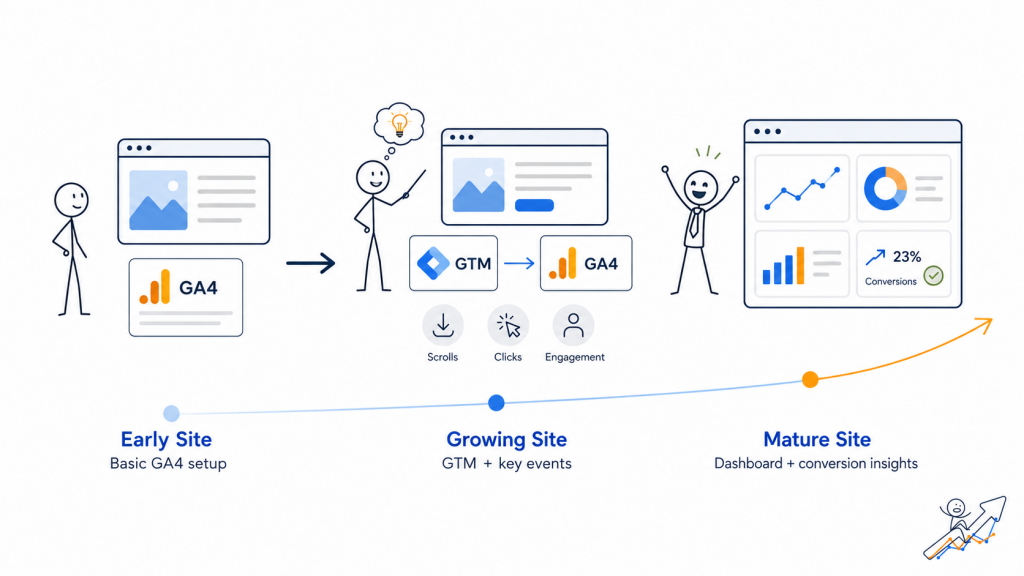
The Bigger Lesson: Tracking Should Match the Website Stage
Not every website needs the same analytics setup.
A local service business running Google Ads needs conversion tracking as early as possible. A lead generation site needs form submission and call tracking. An e-commerce site needs product, cart, checkout, and purchase tracking. A content-led marketing site needs page performance, engagement, channel visibility, and eventually monetization events.
My site is a content-led marketing lab.
That means the first measurement questions are not the same as a high-volume e-commerce store.
Right now, I want to understand:
- whether Google is discovering and testing the content
- which topics begin receiving impressions
- which articles get clicks
- which pages attract users after publication
- whether users move beyond the first article
- which future internal links may deserve priority
- whether tool-related content behaves differently from experiment content
- how traffic changes as the content base grows
Those are early growth questions.
Later, when the site has more traffic and monetization layers, the tracking questions will become more commercial:
- Which articles send users to resource pages?
- Which tool reviews generate outbound clicks?
- Which CTAs attract engagement?
- Which content clusters support email sign-ups?
- Which pages assist conversions even if they are not the final touchpoint?
- Which traffic sources bring readers who actually explore the site?
That is why GTM and GA4 setup should not be treated as a one-time checklist.
It is a measurement system that should mature with the website.
A Common Business Mistake: Installing Analytics After the Real Decisions Start
One of the reasons I wanted to write this article is because I have seen the opposite situation too many times.
A business launches a website.
Then it starts posting content.
Then it runs ads.
Then it changes landing pages.
Then it asks why leads are weak.
Then someone checks analytics and realizes the setup is incomplete.
At that point, the business is not only missing data. It is missing learning history.
It cannot clearly compare before and after. It cannot confidently separate traffic quality from conversion issues. It cannot easily understand whether a campaign failed because the audience was wrong, the landing page was weak, the offer was unclear, or the tracking was broken.
That creates expensive uncertainty.
This is why I believe analytics should be installed before serious traffic work begins.
Not because GA4 magically solves marketing problems.
It does not.
But clean measurement helps you ask better questions.
What This Setup Changed in How I See My Site
Before setting up GTM and GA4 properly, the site was already real.
It had a domain.
It had articles.
It had structure.
It had branding.
It had search visibility signals.
But after the tracking setup was fixed, the site became more measurable.
That changes how I think about the next steps.
Now, when I publish the next article, I am not only publishing content. I am adding another page into a system that can be observed.
When I improve internal linking, I can later watch whether users move between related articles.
When I create a resource page, I can measure whether it becomes a useful bridge or just another static page.
When I add affiliate links in the future, I can measure whether tool content actually creates outbound intent.
When I build the Performance Dashboard, I will have a cleaner data source to work from.
This is the point where a website starts becoming more than a set of pages.
It becomes a learning environment.
And that fits the Marketing Lab idea very well.
What I Would Recommend to Business Owners
If you are a business owner, I would not start by asking whether you need the most advanced analytics setup.
Start with a simpler question:
What decisions will I need to make from this data?
If you are planning SEO, you need to understand which pages attract search visibility and what users do after landing.
If you are running paid ads, you need to know which campaigns generate meaningful actions, not just clicks.
If you are building a content site, you need to know which topics earn attention and which ones support deeper engagement.
If you are preparing for affiliate monetization, you need to know which articles create outbound intent.
If you are redesigning a site, you need baseline data before you change everything.
The tracking setup should match those decisions.
For a small or early-stage website, a practical starting point might be:
- GA4 installed correctly
- GTM used as the main tag control layer
- no duplicate GA4 firing
- Search Console connected separately for search visibility
- basic events checked before interpreting reports
- future event plan documented before scaling campaigns or monetization
That is enough to start.
Not perfect.
Not overbuilt.
But clean enough to learn from.
What I Would Do Next
For this site, the next step is not to create a complicated analytics machine.
The next step is to let the content base grow while keeping measurement clean.
After that, I would gradually add events that match the site’s real development:
- Scroll tracking
Useful for understanding whether long-form articles are actually being consumed. - Outbound click tracking
Important for future tool reviews, affiliate links, and external resources. - CTA click tracking
Needed once the site has stronger calls to action around resources, contact, email, or prompt products. - Internal navigation tracking
Useful for seeing whether articles connect logically and whether users move across content clusters. - Dashboard structure
Eventually, I want the Performance Dashboard to reflect real site learning, not vanity numbers.
The project notes already identify scroll tracking, outbound click tracking, CTA click tracking, and deeper article performance measurement as future tracking layers.
That is the right sequence.
First, make the base clean.
Then publish enough content to observe.
Then add event tracking where it answers a real question.
Then build reporting around decisions, not decoration.
Final Takeaway
What I learned after setting up GTM and GA4 on my own site is that analytics setup is not just a technical task.
It is a strategic starting point.
The most important part was not simply seeing data appear in GA4. The important part was making sure the data was not duplicated, the architecture made sense, and the setup could support future experiments.
For Web Idea US – Marketing Lab, this matters because the site is being built as a public growth asset. The goal is not only to publish articles. The goal is to observe how content, structure, SEO, tools, visibility, and traffic behave over time.
And that requires measurement.
A website can grow without perfect analytics.
But if you want to learn from the growth, improve decisions, and avoid guessing, clean tracking should be part of the foundation.
Not later.
Early.
Before the numbers start influencing your decisions.